Hospitality and restaurants
Changing shifts, breaks, absences and quick clock-ins for rotating teams.
Time tracking and workforce management software
Manage clock-ins, shifts, absences, work orders, GPS routes, expenses, documents, customer reviews and team communications from a single platform.


HR operations
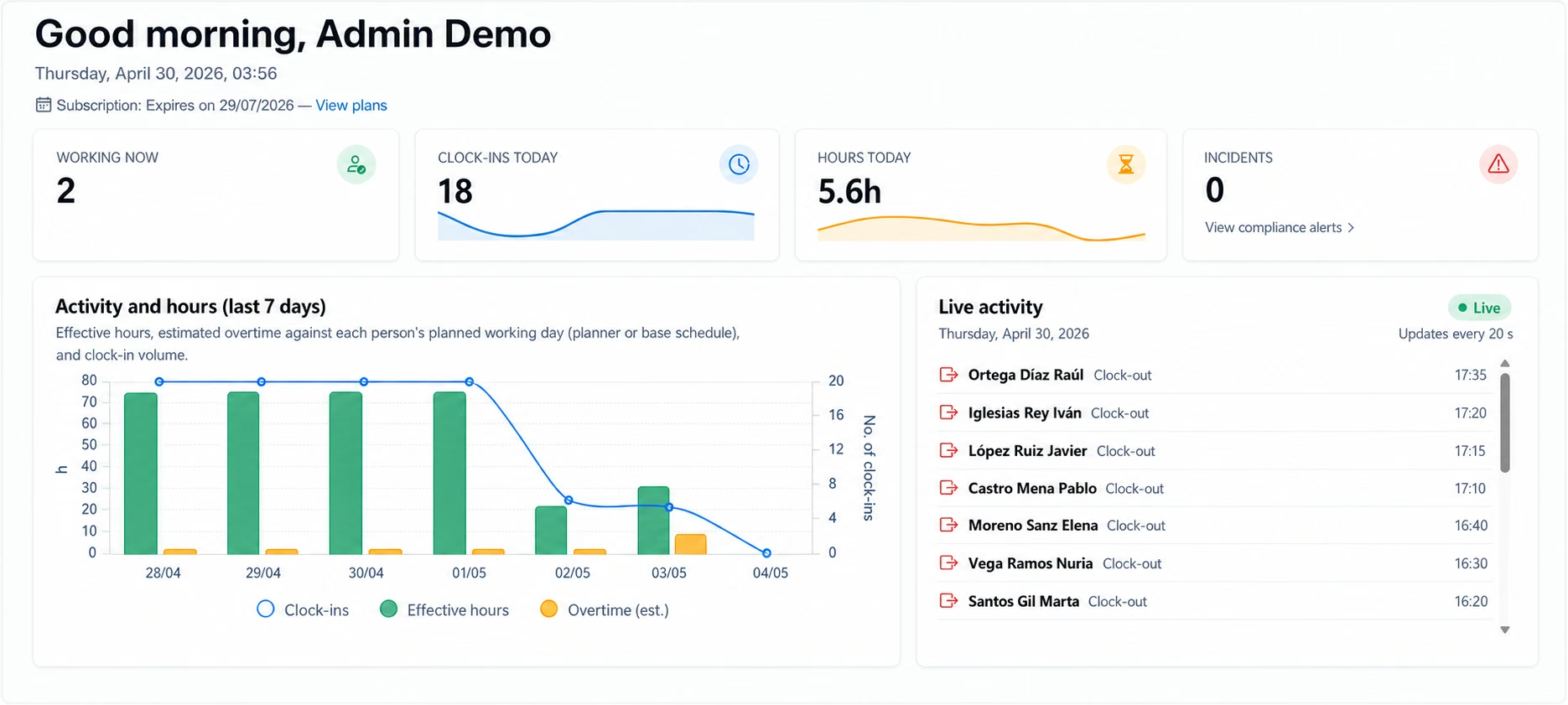
From clock-in to reports, Jornadapp brings together the tools you need to manage employees, workdays, shifts, requests and documentation from one simple platform.
Record clock-ins, clock-outs, breaks and incidents with GPS, approximate IP, QR, NFC or web access. Each clock-in can keep time, method, location, device and related security evidence.
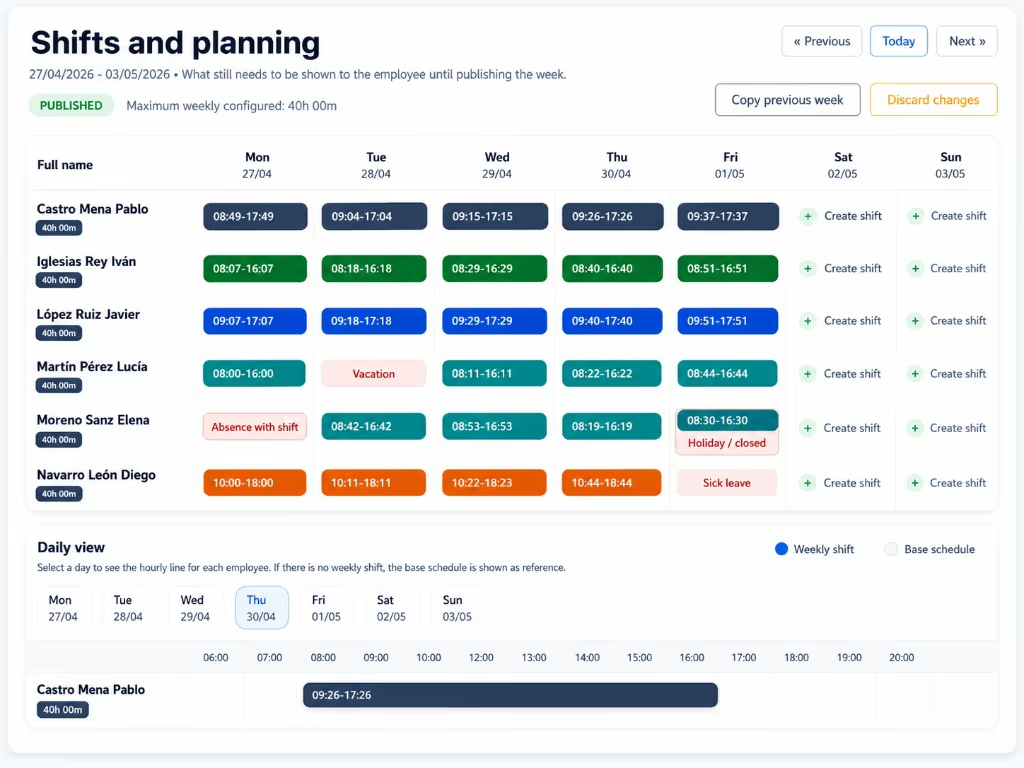
Manage employees, sites, workdays, shifts, holidays and absences in one central place without spreadsheets or messy processes.
Each employee can clock in, check their day, review shifts, send requests, submit expenses, access documents and communicate with the company.
Generate reports, review hours sign-offs, control incidents and export data for internal review and working-time compliance.
Use cases
Jornadapp fits companies with shifts, mobility, multiple sites, managers and daily processes that need order.
Changing shifts, breaks, absences and quick clock-ins for rotating teams.
Control stores, managers, schedules and clock-ins from one shared panel.
GPS clock-ins, locations, incidents and traceability when teams work off-site.
Employee portal, documents, requests, reports and hour closures without spreadsheets.
QR, NFC, geolocation and sites to coordinate workers across different locations.
Multi-manager access, reports, permissions and optional modules to professionalise HR operations.
A clear view to control clock-ins, employees, absences, requests and reports from the company panel and employee portal.
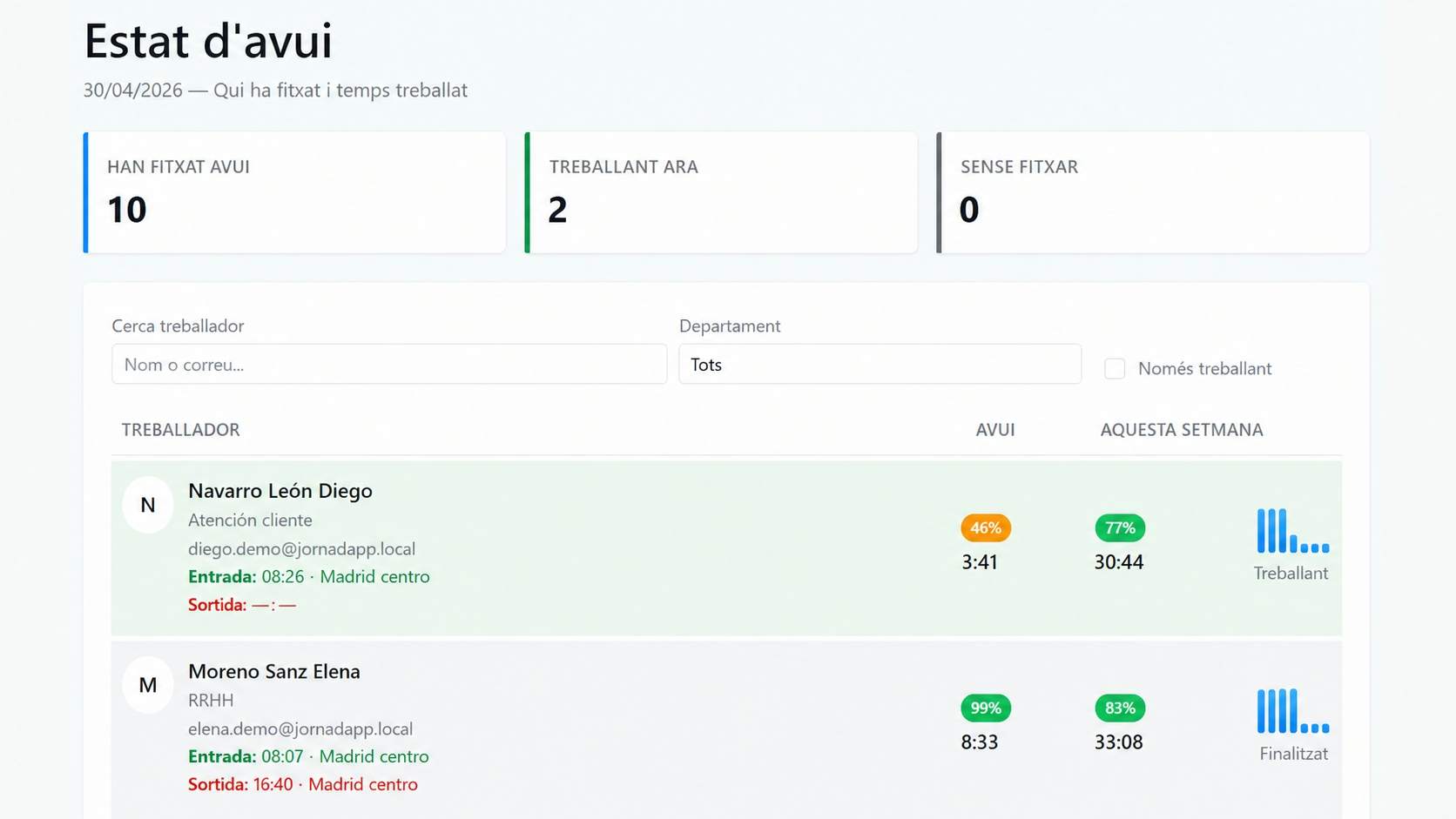
Check who is working, who is on break, which shifts are still open and which incidents need review.
Review time, method, location, device and the information attached to each attendance record. Jornadapp can link the clock-in to the worker’s authorized device and flag attempts from unrecognized phones.
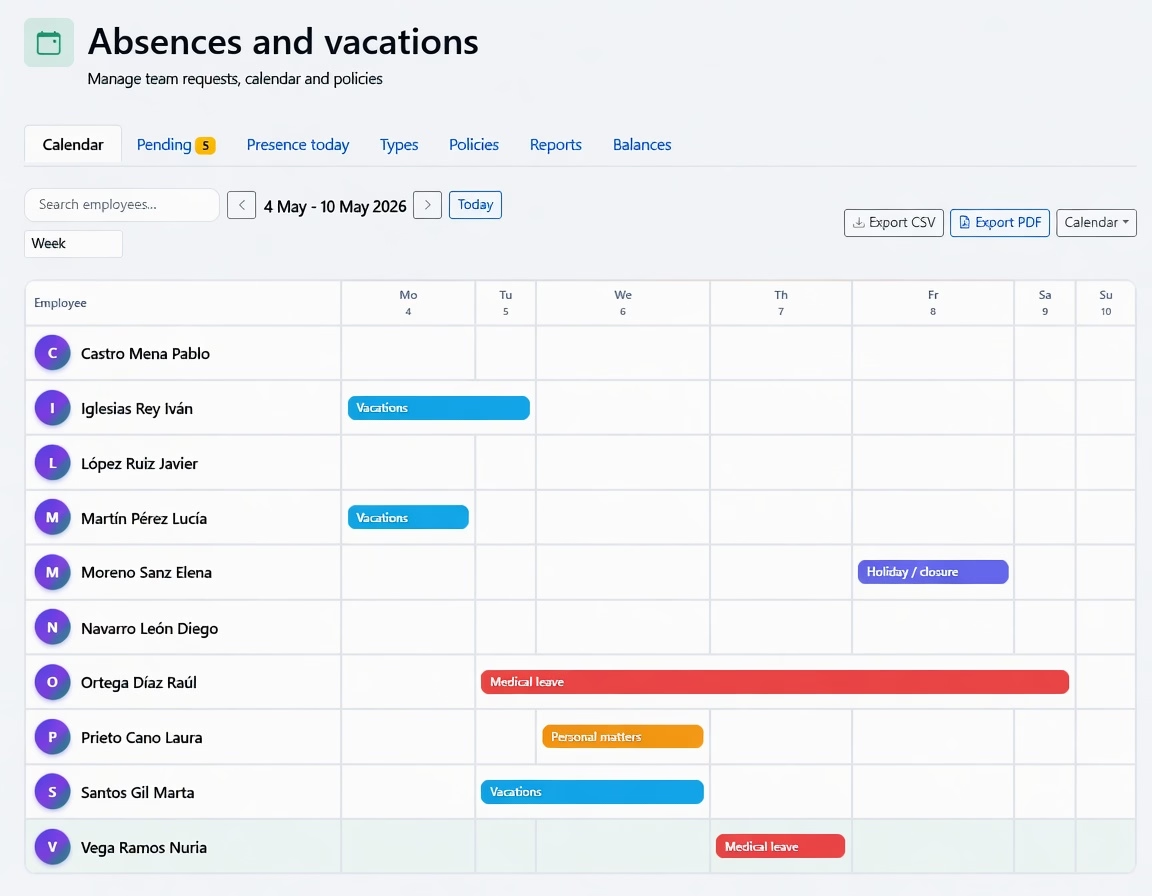
Check the team calendar, see who is available and approve holidays, sick leave or days off from one place.
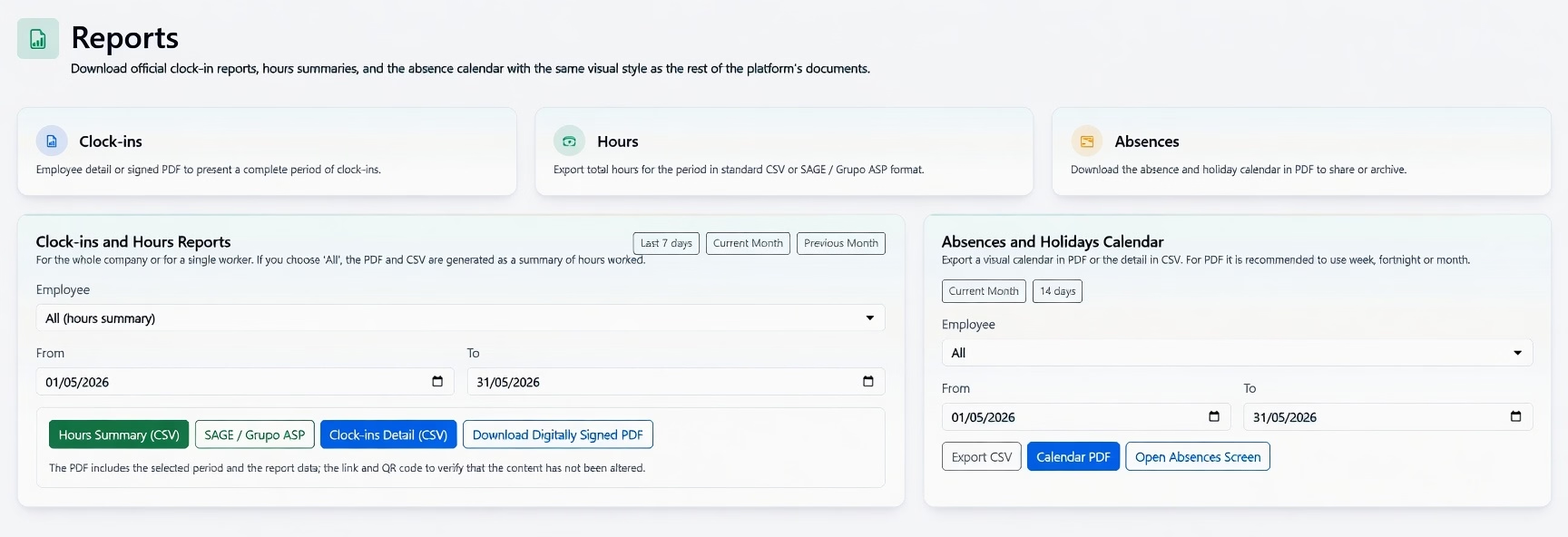
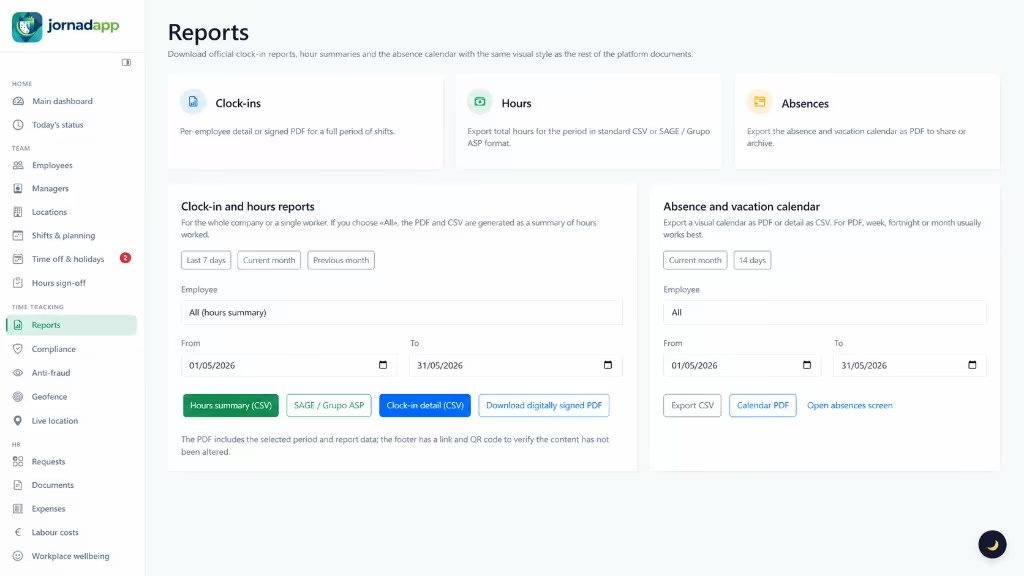
Generate hours, clock-in and absence reports with the same visual style you see in the platform: download them as digitally signed PDFs with QR codes, ready for audits or internal sign-off.
Mobile teams
Coordinate people while they work, review real journeys and respond to help requests with context. Jornadapp separates urgent events from useful information and keeps an easy-to-review history.

A cautious GPS-based estimate. “In a vehicle” does not prove the person was driving, and this analysis uses no additional route credits.
Shows clocked-in workers only and separates recent, last-known and help-alert positions. Activity is conservatively classified as on foot, in a vehicle, stopped or unknown.
Records real GPS, calculates road distance where matching is reliable and preserves the GPS trace on tracks, worksites or detours.
Workers can tap “I need help” from Clock-in. The alert stays at the top with priority, a fixed alert location and current-position follow-up when available.
Field work and quality
Assign work orders to technicians and mobile teams; once a service is finished, share a unique link so the customer can rate the service. Everything remains connected to the same job.
“Punctual service and a very clear explanation.”
Employees see customer details, address, notes, checklist and materials without searching messages or calls.
Completion notes, result photos and a conformity signature remain attached to the job for the company to review.
Customers rate the visit from mobile upon completion. Real feedback tied to the work order and technician.
Enable additional modules according to how your company, sites and managers work.
Optional add-on: record receipts, allowances and mileage claims with company review.
Organise payroll, certificates and files by employee, year and period.
Centralise employee requests and avoid scattered conversations.
Define valid clock-in areas and check location while the workday is open.
Included in the plan: “I need help” button in Clock-in with location so the company can respond to mobile teams.
Optional add-on: record work trips, calculate road distance and review the route map.
Create and assign work orders with client details, GPS navigation, call, photos and a signature of acceptance.
See which phone each employee clocks in from and strengthen login with Play Integrity (Android) and App Attest (iPhone).
Connect Jornadapp with ERP, n8n, Make, Zapier or other systems through webhooks.
Optional add-on: lightweight conversations with employees and push notifications.
Get alerts for clock-ins outside allowed zones, new devices, incidents, pending requests or records that need a review.
Organise sites, departments and managers so each team only handles the information that belongs to them.
Compliance and evidence
Each clock-in can keep time, method, device, location when relevant, history and security evidence so the company works with traceable, reviewable data.
PDF/CSV exports and documents with integrity fingerprints for time record review.
Employees confirm their hours and the company reviews issues before closing periods.
Clock-in methods, location, authorized device, record signing and Play Integrity / App Attest checks help flag doubtful clock-ins, even when valid credentials are used from an unrecognized phone.
Requests, absences, documents and expenses stay linked to the right team and period.
How it works
They record start, end and breaks using the methods the company allows. Where applicable, the clock-in is linked to the employee’s authorized device.
Managers and admins see team status, review incidents, plan shifts and manage absences. They can also review alerts for new devices or clock-ins flagged as suspicious.
Records are ready for reports, weekly sign-offs, exports, internal review and compliance.
Onboarding
Start with time tracking and activate more tools when the team needs them.
Employees, sites and permissions from the panel, with data ready to leave spreadsheets behind.
Choose web, mobile, GPS, QR, NFC, sites, schedules, shifts and rules for your operation.
Check status, incidents, reports, requests and closures from the same place.
Teams and operations
Jornadapp fits when you have employees, shifts, mobile work, multiple sites or managers who need the same source of truth.
Time tracking, requests, documents and reports without scattered information.
GPS, QR or NFC clock-ins when you need traceability away from the workplace.
Plan workdays, holidays, absences and days off with a clear view.
Organise sites, permissions and managers so each person sees what matters.
Employee portal
Each employee has a simple area to record their day, check information and send requests without relying on WhatsApp, calls or paper.
Clock-in, clock-out, breaks and route from mobile, web, QR or NFC depending on company settings.
See your schedule, company-published shifts and weekly view.
Review assigned jobs, complete task checklists, upload before/after photos and collect customer digital signatures.
Check holiday balance, request time off and track your requests.
Send internal requests with type, priority and attachments; see counters and status without leaving the portal.
Chat with your company, notices and follow-up without leaving Jornadapp.
Payslips and HR files; expense and allowance receipts with photo capture and approval tracking.
Legal obligation & regulatory compliance
Regulations require companies to implement a secure ethics and whistleblower channel. Jornadapp integrates both systems in full compliance with European and national law, ensuring strict confidentiality and deadline tracking.
The EU Whistleblower Protection Directive 2019/1937 is implemented through national laws, including Law 2/2023 in Spain and Law 93/2021 in Portugal. Requirements differ in the UK, Gibraltar and other jurisdictions, so the applicable local framework must be checked. A trusted channel helps detect fraud, corruption, money laundering and harassment early while preserving evidence and protecting informants.
Compulsory for companies with 50+ workers. Fines of up to €1,000,000 for failing to provide a channel or breaching confidentiality. Requires 7-day acknowledgement and 3-month resolution.
Requirements vary by country. In Spain and Portugal, employers must adopt measures to prevent and address workplace harassment; Jornadapp provides a configurable confidential channel that can support the applicable local procedure.
Prevent heavy labor inspection fines and protect your workforce with secure channels.
Available to companies with an active plan; enable it in Settings and configure it according to the company’s country and workforce.
Advanced workforce management
Activate additional capabilities according to your team, sites and managers.
Comparison
The difference is connecting time records with the company’s daily work.
| Excel / WhatsApp | Basic app | Jornadapp | |
|---|---|---|---|
| Clock-ins & attendance | Manual on paper or chat messages, error-prone and hard to audit | Clock-in and clock-out only, without operational rules | Clock-in, clock-out, categorized breaks, GPS geofences, dynamic QR, NFC, PIN, and kiosk mode for job sites |
| Security & legal validity | No legal validity, easy to tamper with | Simple database record without signing or device verification | Authorized devices, Play Integrity / App Attest, digitally signed clock-ins, tamper-proof hash, and official PDF |
| Work orders & field jobs | Paper sheets, scattered chat notes, phone calls, and lost job records | Not available (requires a separate external app or SaaS) | Digital work orders with task checklists, GPS navigation, before/after photos, and customer digital signature on mobile |
| Customer reviews & ratings | Non-existent or disconnected manual surveys | No client module or service rating features | Unique QR code and direct link on each job sheet: 1-5 star ratings, key highlights, and real reviews linked to the worker |
| Routes & travel mileage | Rough guesses, paper fuel receipts, and mileage disputes | Only a single GPS point when pressing clock-in | Automated travel tracking during work hours, real road distance calculation, fuel cost estimates, and break pause |
| Expenses & allowances | Paper receipts that get crumpled, faded, or lost in pockets | Not available or charged as an extra paid add-on | Mobile camera receipt capture, instant categorization, manager approval, and streamlined settlement |
| Shifts & rosters | Static spreadsheets or photos shared in messaging groups | Basic fixed shifts without peer swaps or instant alerts | Interactive visual planner, rotating shifts, teammate shift swaps, overlap warnings, and automatic hour totals |
| Holidays & absences | Loose forms, back-and-forth emails, and zero team visibility | Limited absence logging without live balance tracking | Site calendar, mobile request with attachments, 1-click manager approval, and real-time balance tracking |
| Documents & payslips | Hand delivery or unsecured emails without delivery proof | No employee document repository | Secure distribution of payslips and contracts with digital signature and delivery confirmation |
| Employee portal | Constant calls and text messages to HR/management | Bare minimum access limited strictly to clocking in | Full web portal and mobile app: workday, shifts, requests, documents, expenses, jobs, and chat |
| Communications & chat | Chaotic WhatsApp groups intruding on personal privacy | No corporate chat or official company announcements | Professional internal chat, company-wide announcements, and push alerts without exposing personal phone numbers |
| Inspection reports | Hours of manual calculation and high compliance sanction risk | Basic CSV exports without certified legal format | Official PDF/CSV reports with cryptographic integrity hash, weekly employee hour confirmations, and immutable audit logs |
| Multi-site & scalability | Becomes unmanageable as headcount or branch sites grow | Lacks granular permissions and multi-site administration | Multi-site, multi-manager, granular roles and permissions, optional add-ons, and webhooks for API integrations |
Jornadapp works from browser, mobile and installable access. Company and employees can work from the office, workplaces or on the move.
Available now on Microsoft Store for Windows, Google Play, AppGallery and the App Store, plus the installable web version.
Use the Android app or installable web access to clock in, review shifts, submit expenses, reply to chats and receive alerts.
In Chrome: browser menu > "Install app" or "Add to Home screen".
View on Google Play View on AppGalleryThe iPhone app mirrors the mobile workflow with clock-in, shifts, expenses, requests, chat and notifications.
In Safari: Share > "Add to Home Screen".
Open in App StoreOpen the full dashboard, reports and settings from any browser.
Same access from desktop, tablet or mobile
https://jornadapp.net Install appStart with time tracking and activate more tools when your company needs them.
Pricing
Time tracking, employee portal and day-to-day workforce management in one plan per active user.
One tiered plan plus optional extras: live tracking, expenses and allowances, internal chat, and routes and mileage.
14-day free trial: full access to your selected plan features for the whole trial period.
Amounts exclude VAT; the rate shown is added when you subscribe.
Per active user per month · tiered pricing · monthly minimum
Businesses established in another EU country with a VAT number validated in VIES: 0% VAT under the reverse-charge mechanism.
One plan for day-to-day operations, with no mandatory add-ons.
Premium modules activated per company: tracking, expenses, chat and routes. The first charge can be prorated to align with your plan renewal.
Amounts exclude VAT; the rate shown is added when you subscribe.
Live map during the shift, activity states, long stops and prioritised help alerts.
129,00 € /year (reference)
Receipts, allowances and mileage with an approval workflow.
109,00 € /year (reference)
Internal messaging between managers and staff with push alerts.
99,00 € /year (reference)
GPS routes with road distance, stops, time by activity, timeline and manager history.
79,00 € /year (reference)
Solutions
Discover how Jornadapp streamlines time tracking, shifts, leave, reports, expenses, employee documents, requests and daily workforce workflows.
Clock in with GPS geofencing, verified timestamps and privacy compliance. Time tracking for field teams and mobile staff without continuous surveillance.
Turn any phone or tag into an instant attendance station. QR code and NFC time tracking for offices, restaurants, warehouses and shared job sites.
Plan weekly staff rotas, publish schedules and compare planned hours against actual clock-ins. Integrated shift management and time tracking.
Track annual leave, sickness, parental leave and public holidays. Streamlined absence requests, approval workflows and real-time team balance.
Employee self-service app: clock in, view shifts, request holidays, download pay slips and submit expense receipts from any mobile or desktop.
Generate official time tracking reports, weekly signoffs and CSV exports for audits, payroll and labor inspections with full traceability and integrity.
Manage employee expenses, travel allowances, meal per diems and mileage claims. Receipt photo capture, manager approvals and payroll export.
Distribute payslips, employment contracts and company policies securely. Role-based permissions, read receipts and digital signatures.
Manage internal requests, schedule adjustments, certificate petitions and equipment requisitions with clear approval workflows and audit trails.
Track work hours allocated to client projects, tasks and cost centers. Measure labor productivity, job profitability and generate client billing.
Manage attendance across multiple branches, stores, offices and warehouses. Centralized dashboard, local managers and cross-site employee rotas.
Connect with HMAC webhooks, a read-only REST API for employees and clock-ins, and scheduled monthly payroll CSV exports.
Help
Answers about the platform: clock-ins, employee portal, shifts, absences, reports, security, apps and integrations.
Yes. You can try Jornadapp free for 14 days with your plan features, with no commitment during the trial.
No. You can create your account and start the 14-day trial without entering a card. The trial expires automatically and does not trigger a charge.
Single plan per active user by tier, with a monthly minimum and VAT at the applicable rate. Includes a 14-day trial. Optional extras (live tracking, expenses and allowances, internal chat, and routes and mileage) are activated per company. Prices are shown before VAT: if your business is established in another EU country and its VAT number is validated in VIES, the invoice carries 0% VAT under the reverse-charge mechanism; otherwise the plan VAT rate applies. See Pricing on the home page for current rates.
You can create the company, choose clock-in methods and add your first employees in a few minutes. If you already have a staff list, our team can help import it.
Yes. Send us your Excel, PDF or CSV and our team will review the list and create the accounts at no per-worker cost.
Before registering, you can talk to us by phone or WhatsApp. Customers also get traceable support tickets from the panel.
Create your account, set up your company and try Jornadapp free for 14 days.